How this guide works
We make BrightLog, so this is an insider’s guide rather than a neutral review, and we say so in the first line. It compares kinds of mood journal app — fast loggers, long-form journals, guided check-ins, habit and streak apps, therapy-minded apps — not brands, because the kind you choose matters more than the name on the icon, and every app within a kind changes faster than any list can follow. For each kind you will find what it does well, the questions worth asking before you commit, and how BrightLog answers them. We describe no other product, and BrightLog only in facts you can check in the app, as it ships in September 2026.
The short answer
There are five kinds of mood journal app, and each answers a different reason people start. Fast loggers make the record cheap enough to keep. Long-form journals give a day room to be written down. Guided check-ins hand you the first question. Habit and streak apps turn intentions into rings and runs. Therapy-minded apps borrow structure from the consulting room. Most people want two or three of these at once, which is why the honest comparison is not “which app” but “which questions”. The table gives each kind its strengths, the checks worth making before you commit, and BrightLog’s answer in its own features.
| Kind of app | Good at | Check before you commit | The BrightLog answer |
|---|---|---|---|
| Fast mood loggers | A record kept in seconds | Can you say more than “bad”? Does it survive a lost device? | One tap; then an 82-word feelings wheel, a note, a photo or a voice note, only if you want; a widget with the five faces |
| Long-form journals | Room for the whole day, for years | Where do the words live? Can you search, lock and export? | Photos, video, voice notes, documents, follow-ups, search, a calendar, App Lock, PDF and CSV — on your device, never seen by us |
| Guided check-in apps | A first question, so a blank page never stops you | Who wrote the prompts? Do they soften on a hard day? | A wizard that asks how you feel; hand-written daily nudges, gentler after a bad day, answered Done, Later or Not today |
| Habit and streak apps | Momentum — rings, runs | What does a missed day cost? Can you pause? Is progress private? | Your week, What lifts you, Take a break from goals — nothing counts as missed; one streak freeze a month; 30 private badges |
| Therapy-minded apps | Structure from the consulting room | Is the structure recognised? What reaches an AI, and when? | A thought record on any entry, 16 thinking styles, a seven-part session preparation as a PDF — written only when you ask, never seen by us |
Fast mood loggers
A fast mood logger asks one question — how are you? — and accepts a face, a number or a colour as the whole answer. The entry is done in the time it takes to unlock your screen. The record costs so little that it survives busy weeks, low weeks and the weeks you forget the app exists, and after a few months the calendar of colours shows you things no single day could. If your last journal died because writing felt like homework, this is the kind that fixes it. The check is what happens when a face is not enough.
Ask: Can you say more than “bad” when a day deserves it? Can a log carry a note, a photo, your voice? Where does the backup go? Is there a widget, a lock, your language?
BrightLog’s answer: one tap — Awesome, Good, Not sure, Bad or Terrible, one mood a day — and you can stop there. Then the feelings wheel: seven core emotions, forty-one shades, eighty-two precise words, so “bad” can become “humiliated” or “isolated”. A note, a photo or a voice note is optional; the Daily Mood widget puts the five faces on your home screen. No account is needed to start.
Long-form journals
A long-form journal is built for the days that need paragraphs. It gives you a proper writing space, takes photos, and keeps the years in a timeline you can scroll back through. This is the kind that holds a whole moment — what happened, how it landed, what you noticed afterwards — and the kind whose archive becomes precious, because ten years of it is a life story. Its strengths are room, richness and permanence. The checks follow from them: something you will write into for years has to be yours in every sense, so ask early where the words live and who could read them.
Ask: Does it take photos, video, audio and documents? Can you add to an entry later? Is there search, a calendar, a lock? Is it on your device or the company’s servers? Can you export it?
BrightLog’s answer: an entry holds what happened and how it landed, with photos, video, voice notes and documents — up to twenty per entry — and you can speak instead of type. Follow-up notes weeks later show how a thing looked over time. Search and a calendar cover it all, App Lock guards it, and it exports to PDF or CSV. Backup goes to your own iCloud on iPhone or Google Drive on Android, which only you can access.
Guided check-in apps
A guided check-in app never leaves you facing a blank page. It opens with a question — how is your energy, what happened today, what are you grateful for — and walks you through a short sequence until an entry exists. For many people that structure is the difference between a journal that gets used and one that gets deleted: the app decides where to start, so you only have to answer. The strength is a low first step and a rhythm that feels like being asked rather than told to write. The check is what the guidance does on hard days, and who wrote the questions.
Ask: Who writes the prompts — people, or a machine? Do they change after a bad day? Can you stop after the first answer? Can you set the hours? Is it written in your language?
BrightLog’s answer: when you know how you feel but not what to call it, “Help me log” asks about the feeling — a core emotion, a shade, the precise word — and opens the right kind of entry. Daily nudges bring short moments of care — water, a stretch, a minute outside — in twenty kinds, one to twelve a day within your hours, each answered with Done, Later or Not today; after a low mood is logged only the gentlest come for the rest of that day. Every line is written by people, in all twenty languages.
Habit and streak apps
A habit and streak app turns an intention into something you can see: a ring that fills, a run of days that grows. That visibility is real motivation: a streak at forty is a reason to open the app at ten to midnight. This is the kind to choose if you already know what you want to do more of and need momentum. Its strengths are clarity and encouragement. The check is what the design does when life interrupts, because it will: a holiday, an illness, a week when the goal was the last thing that mattered. How an app treats that week is the whole product.
Ask: What does a missed day cost? Can you pause without it counting against you? Are streaks private, or ranked against strangers? Does it connect what you did to how you felt?
BrightLog’s answer: “Your week” shows a ring per goal, twelve weeks at a glance, and its review card never scolds: what did not lift your mood is said neutrally, as a pattern, not proof. “What lifts you” names the task you rated most enjoyable and most satisfying. “Take a break from goals” pauses everything for a day, three days, a week or until a date you choose — “No reminders, and nothing counts as missed.” The daily streak bridges one missed day a month with a freeze, and a streak that restarts keeps your best run.
Therapy-minded apps
A therapy-minded app borrows its structure from the consulting room. Instead of “how do you feel”, it asks what a therapist would — what went through your mind, what supports that thought, what argues against it — and may summarise a stretch of entries into something you can bring to a session. This kind makes the hour with a professional count for more, because you arrive with evidence instead of a vague sense that the month was hard. The checks matter most here, because these are the most personal words you will write, and a summary is only useful if it is honest about what it is.
Ask: Is the structure a recognised one? Can you hand it to your therapist? Does it say plainly that it is not a diagnosis? What reaches an AI, and does the rest work without it?
BrightLog’s answer: any entry can carry a thought record — the thought, the facts for it, the facts against it, how it looks now — and the in-app help explains the 16 unhelpful thinking styles. “Prepare for session” turns any stretch of up to 60 days into a seven-part preparation that includes your goals and habits, as a PDF or copied text, marked on the page as “AI-suggested patterns based on your entries and goals, not a clinical diagnosis”. Everything else works without signing in. The Experts tab lists professionals near you, nearest first.
What BrightLog does
BrightLog is all five kinds in one app, free, with no in-app purchases. The check-in is one tap; the journal holds a whole day; a wizard and daily nudges guide you when you want guiding; goals and streaks keep momentum without punishing a missed day; a thought record and a session preparation bring the consulting room in. Underneath it all is one design choice: everything you write stays on your device, and a backup, only if you choose one, goes to your own iCloud or Google Drive. Here is the whole toolkit, with the numbers as they are in the app today.
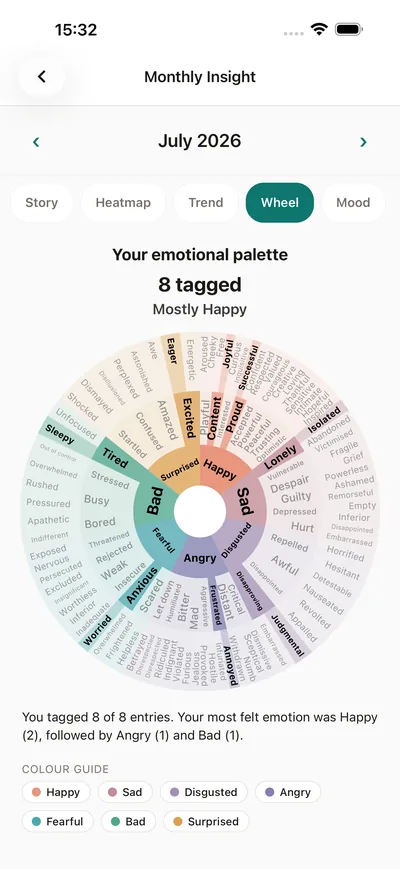
- Mood in one tap — Awesome, Good, Not sure, Bad or Terrible — then, when you want it, the feelings wheel: 7 core emotions, 41 shades, 82 words.
- A journal for the whole moment: type or dictate, attach photos, video, voice notes and documents, add a follow-up weeks later, search it, see the month on a calendar.
- The Gratitude Pot, with photos and video; once it holds ten things, one greets you each day.
- Goals with Your week, What lifts you and Take a break from goals — nothing counts as missed — plus ten Goal ideas.
- Daily nudges: twenty kinds, one to twelve a day, hand-written, gentler after a bad day, answered Done, Later or Not today.
- A thought record on any entry, and 16 unhelpful thinking styles explained.
- A meditation timer: five to thirty minutes, eleven soundtracks or silence, offline.
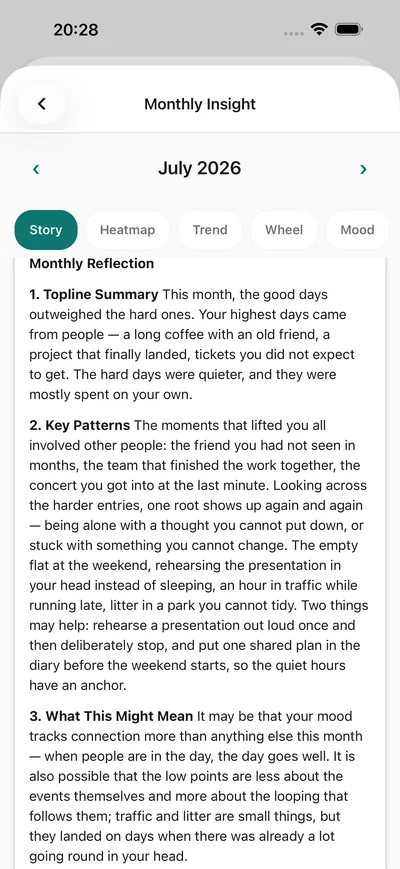
- Insights, monthly and yearly, in five views — Story, Heatmap, Trend, Wheel, Mood — the Story written for you whenever you ask.
- A seven-part therapy preparation of up to 60 days, goals and habits included, as a PDF or copied text.
- Three widgets — streak, mood, today’s tasks — plus App Lock, 30 private badges and 20 hand-written languages.
- Backup to your own iCloud on iPhone or Google Drive on Android, so a new iPhone or a new Android device gets your journal, moods, gratitude, goals and habits back — photos and recordings included.
Where your entries live
The privacy question is the one to ask first, because the answer decides how honest you will be — and a journal you edit for an imagined reader is not much of a journal. For any app, ask five things: where the entries are stored; whether the company could read them; whether you need an account to begin; where a backup goes and who holds the key; and what reaches an AI, when, and what for. Ask for plain answers. Here are BrightLog’s, starting with the one that matters most: we never see what you write.
- Stored: on your device. Your information never leaves it, and we never see what you write.
- Account: none needed to journal, log moods, run goals, meditate or export; you sign in only for a backup, insights or therapy preparation.
- Backup: your own iCloud on iPhone or Google Drive on Android — your account, your storage, which we cannot access.
- Insights: written for you only when you ask for one.
- Nudges: written by people, never generated; none mentions weight, diet, medication or a diagnosis.
- Lock: App Lock keeps the journal behind Face ID, Touch ID, your fingerprint or your device’s screen lock.
- Leaving: “Delete All BrightLog Data” removes everything on the device and every backup in your cloud.
How to choose
Choosing well comes down to matching the kind to the reason your last journal stopped. If writing felt like work, start with a fast logger and make sure it can grow. If a face could never hold the day, you want a long-form journal with room and a lock. If you never knew where to begin, choose guidance written by people. If one missed day ended the run, choose an app that treats rest as a decision. And if you are in therapy, or thinking about it, choose the structure that makes the hour count. Then run the checklist against any app you are considering.
- One tap to record a day, and room to say more?
- Photos, video and my voice, not only text?
- An account to start?
- On my device, or on the company’s servers?
- Where does the backup go, and could the company open it?
- What reaches an AI, when, and can I say no?
- A lock, and an export I can read?
- What does a missed day cost, and can I pause?
- Is my progress private?
- My language, and what is held back for a paid plan?
BrightLog ticks every line: one tap and 82 words; photos, video, voice notes and documents; no account to start; on your device, never seen by us; backups only to your own iCloud or Google Drive; App Lock, PDF or CSV; nothing counts as missed; badges nobody else sees; twenty languages — free, with no in-app purchases and nothing held back.