Why put your journal on the home screen?
Most journaling habits don’t end because people stop caring. They end because the app is four taps away, and on a full day four taps is enough friction to become “later”, and later becomes never. The fix is not more willpower — it is moving the first tap to where your thumb already is.
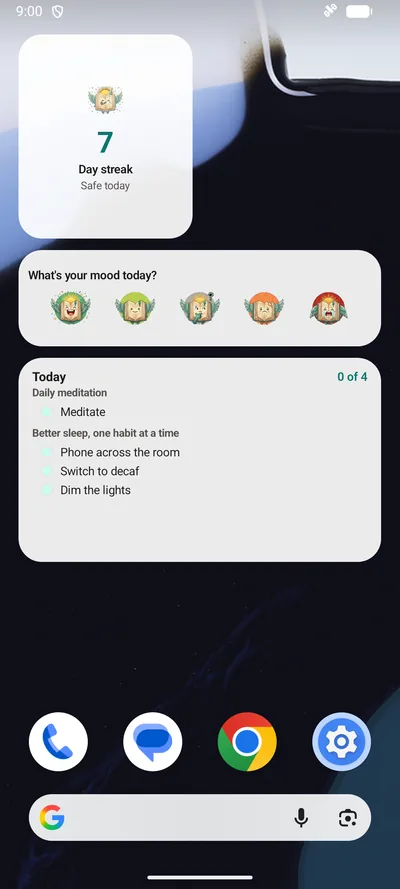
That is what BrightLog’s three home-screen widgets do, on iPhone, iPad and Android alike: Daily Mood logs how you feel in a single tap, Daily Streak keeps your run of days in sight, and Daily Tasks shows today’s habits where you can actually see them. Each one is a door straight into the right screen of the app — and each one works in all 20 of BrightLog’s languages, in light and dark.
Daily Mood — from feeling to logged in one tap
The Daily Mood widget shows the same five faces that open every BrightLog check-in — Awesome, Good, Not sure, Bad, Terrible. Tap the one that fits and the check-in opens with that level already selected: confirm, and today is logged. When you have a minute more, the same check-in lets you name the feeling precisely on the 82-emotion feelings wheel — but on the days you don’t, one tap is a real entry, and a mood series built from quick, honest readings beats a detailed log you abandon in week two.
Already checked in? The widget says so — “Logged today” — and tapping it opens today’s entry so you can revise the reading instead of duplicating it.
Daily Streak — the day, secured
The Daily Streak widget is the mascot, your current run of days, and one line of status: “Safe today” once anything is logged, “Not logged yet” while the day is still open. That one glance — is today safe? — is the gentlest reminder there is: no notification, no badge count, just the streak sitting where you’ll see it anyway.
A detail for night owls: in BrightLog the day doesn’t flip at midnight but at 4 a.m., so a half-past-midnight entry still counts for tonight — the widget won’t guilt you at 00:01. Tapping it opens your badges, the little milestones your consistency has been quietly collecting.
Daily Tasks — today’s plan where you can see it
If you use BrightLog’s goals, the Daily Tasks widget lists what is due today, grouped under the goal it belongs to, with a running count — “2 of 4” — in the corner. Tap it and the check-in opens so you can tick things off; when a day is packed, the list caps itself with “+2 more” rather than shrinking the text into illegibility. On an empty day it says “Nothing due today”, and when you finish, “All done”.
Seeing the plan is half of doing it: a habit needs an anchor, and a list on the home screen is an anchor you can’t tidy away.
Setting them up on iPhone, iPad and Android
On iPhone and iPad: touch and hold an empty spot on the home screen, tap Edit → Add Widget, and search for BrightLog. Daily Streak comes in small and medium, Daily Mood in medium (five faces need the width), and Daily Tasks in medium and large.
On Android: touch and hold an empty spot, choose Widgets, and find BrightLog. All three are resizable — drag the handles to give Daily Tasks more room, or keep Daily Streak at a compact two-by-two tile.
The widgets follow the language you chose inside BrightLog — set the app to any of its 20 languages and the widgets switch with it, whatever language the phone itself speaks. Light and dark follow your system, with no setting to remember.
Private, even on the busiest screen you own
A widget lives on the most public screen of your phone, so it is built to give nothing away: it never shows journal text — the most personal thing on it is the name of a habit you chose to track. Everything it draws comes from a small summary the app prepares on your device; the widgets make no network requests of their own.
The journal behind it keeps BrightLog’s usual rules: entries live on your phone, backups run only if you turn them on and go only to your own iCloud or Google Drive, and if you use App Lock, tapping a widget still lands behind it — the app asks for your unlock before showing anything more than the summary you placed on the home screen yourself.